In this section, you will be acquainted with the newly released premium text to speech engine, its available voices and usage via Unifonic console, Unifonic Flow Studio and direct Voice API.
What
Based on popular demand and to align with rapidly emerging technologies, Unifonic's premium text-to-speech (TTS) is AI-enhanced, human-like AI powered high quality voices.
A multilingual lifelike speech synthesis, producing more natural and expressive speech. It also enables most stable long-form human-like interactions.
It is offered via paid usage consumption as tiered subscription plans/packages, supported by ElevenLabs.
How To Access It
A- From voice channel page on Unifonic console:
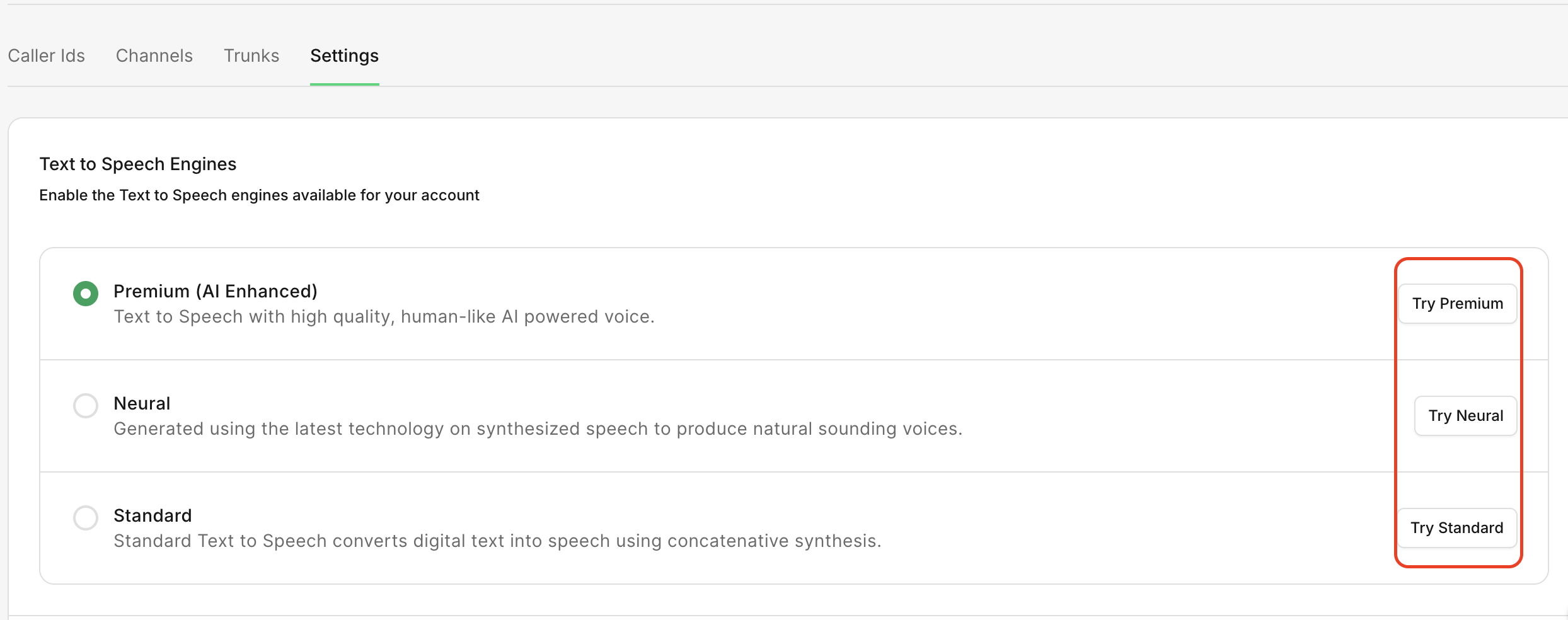
ElevenLabs (Premium) ttsEngine is now provided along with google (Standard) and Sestek (Neural) in the Voice->Settings page on uC
The following actions can be performed; customers can now:
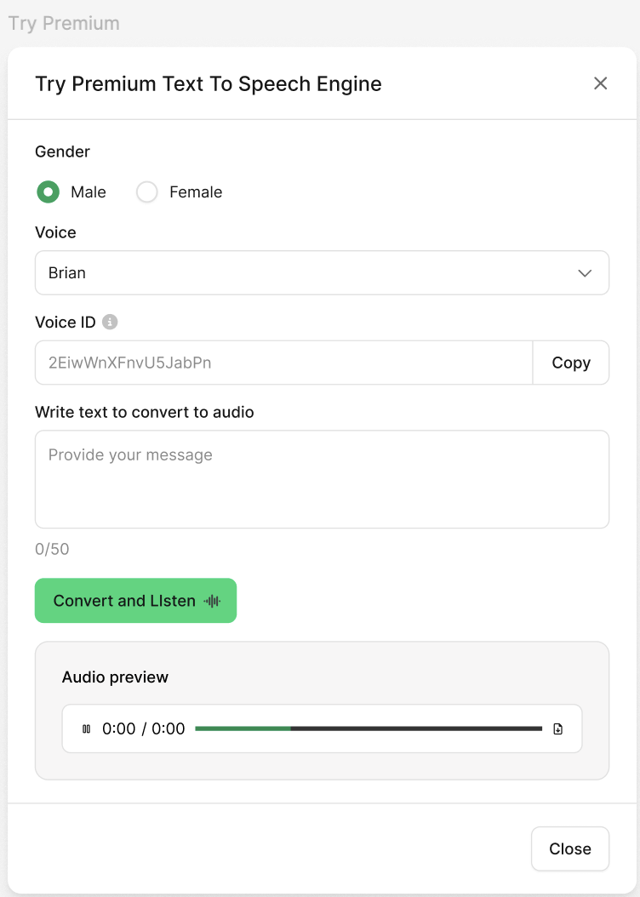
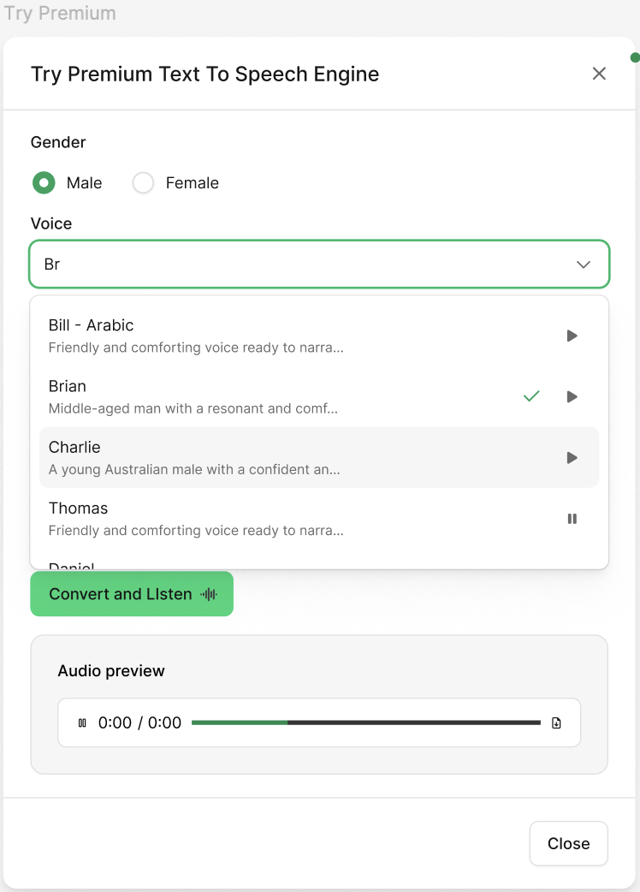
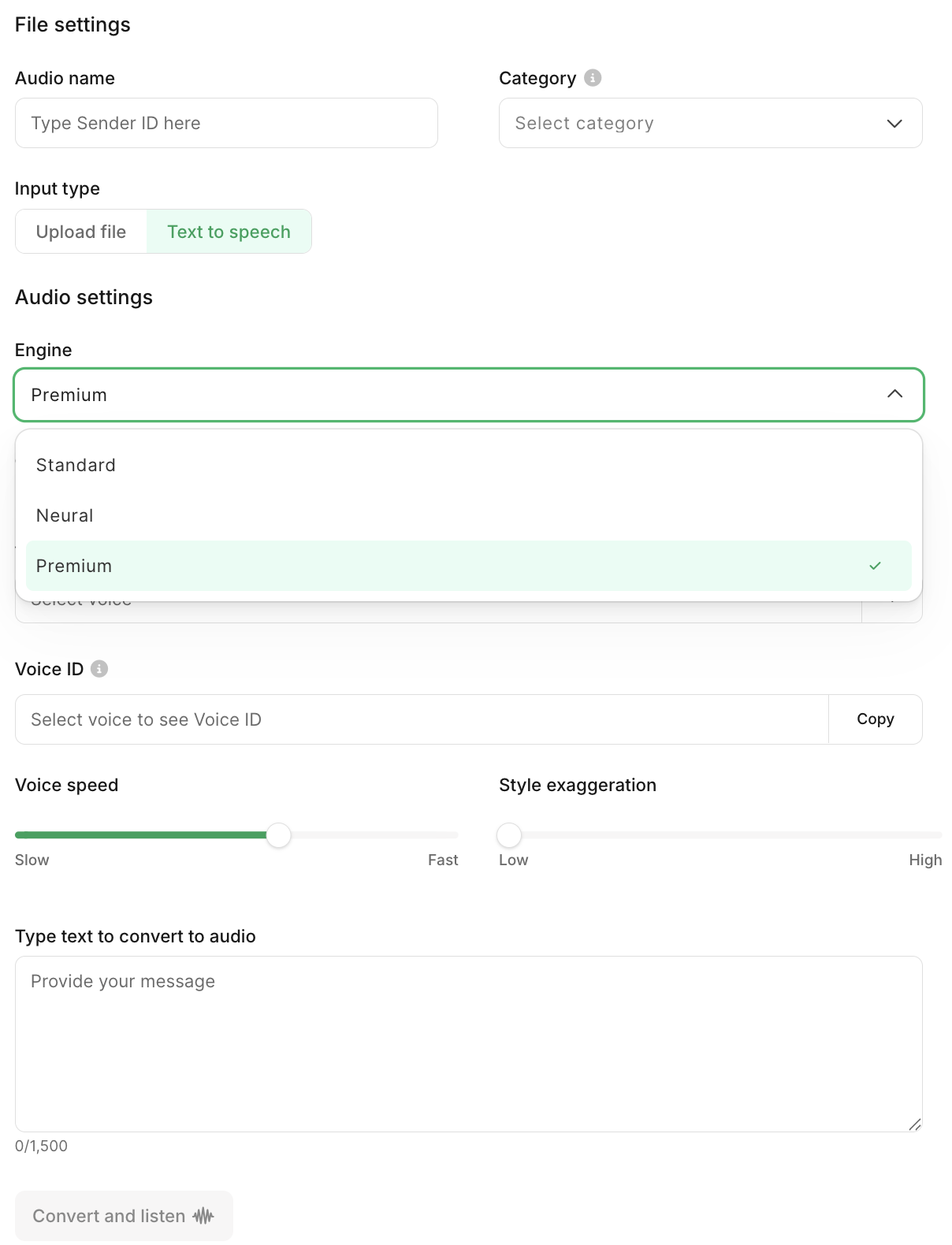
try out the premium engine to compare the output and decide which is suitable for your audience
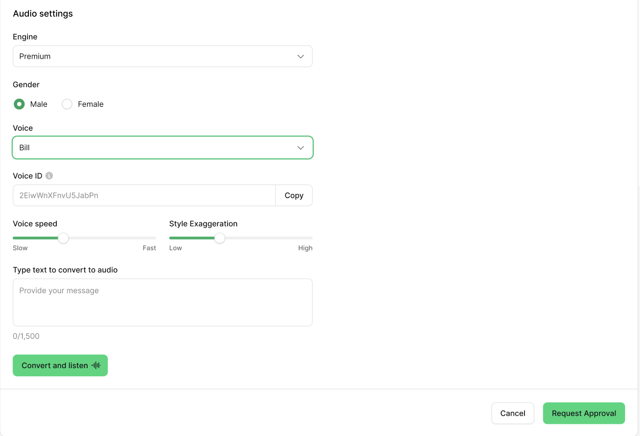
2. go to Library->Audio->Add New Audio->Text to speech->select the premium engine to fetch the pre-populated voices
copy the Voice ID to use in API request payload (for API customers)
set/adjust the speaking rate to their desired preference for all Premium voices - i.e. from Slow->Medium->Fast
set/adjust the Style exaggeration to their desired preference for all Premium voices - i.e. from Low->Medium->High
input text and click “Convert and listen” to listen to the output
switch voices and adjust settings as desired, and once output is satisfactory, click “Request Approval” to submit generated voice for internal review and approval by the customer support team.
B- From Flow Studio page on Unifonic console:
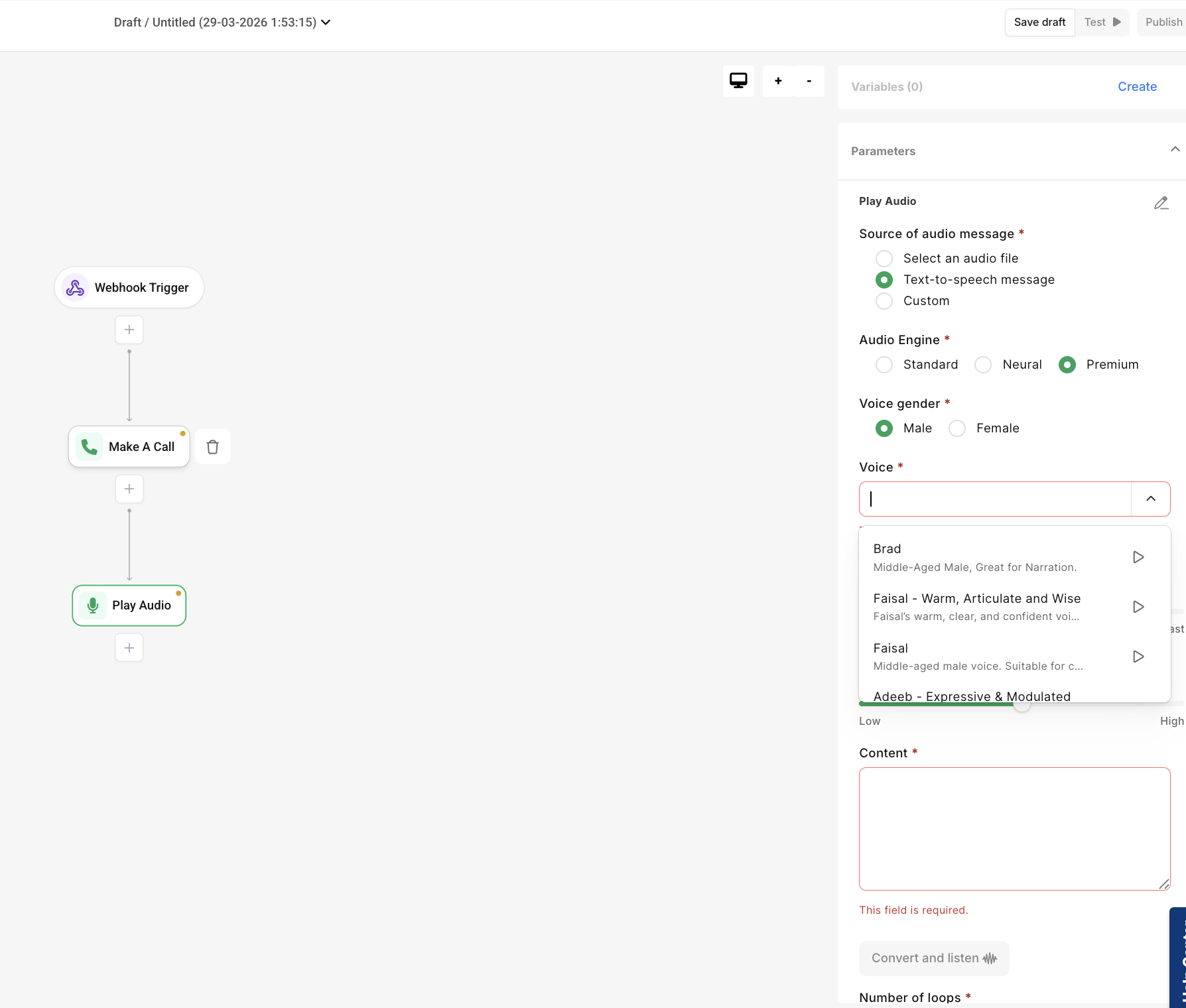
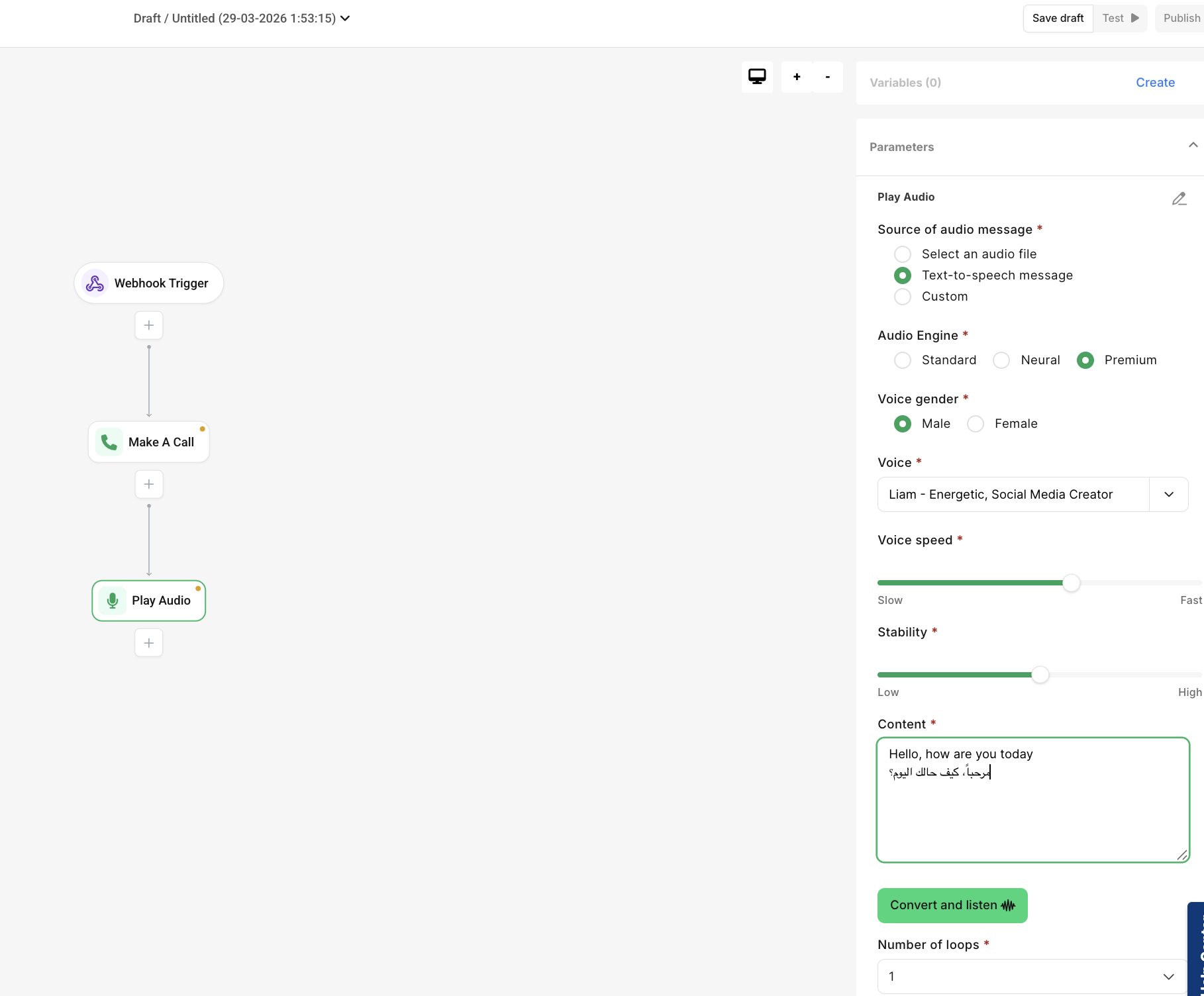
- If your account is enabled for Flow Studio, or you are an existing flow studio user - go to this page: https://docs.unifonic.com/articles/products-documentation/play-audio ,which describes how to create voice make a call and play audio widgets. Then follow the below steps to test and use premium text-to-speech
- create a new flow, choose webhook trigger->Make A Call->Play Audio->Text-to-speech message->Premium->Gender->Voice->input your text and click to convert and listen
C- From Voice APIs:
To use premium TTS in Voice API - you need to know the Voices and their IDs which can be fetched from the voice channel audio library page as initially described in 'A' above - some sample voices and their IDs are provided below:
| Voice ID | Name |
| 5Q0t7uMcjvnagumLfvZi | Paul |
| 9BWtsMINqrJLrRacOk9x | Aria |
| AZnzlk1XvdvUeBnXmlld | Domi |
| CYw3kZ02Hs0563khs1Fj | Dave |
| CwhRBWXzGAHq8TQ4Fs17 | Roger - Laid-Back, Casual, Resonant |
| D38z5RcWu1voky8WS1ja | Fin |
| EXAVITQu4vr4xnSDxMaL | Sarah - Mature, Reassuring, Confident |
| FGY2WhTYpPnrIDTdsKH5 | Laura - Enthusiast, Quirky Attitude |
| GBv7mTt0atIp3Br8iCZE | Thomas |
| gFqEbrURNHZpUOmMsx2f | Hakeem - Mental Saudi Therapist |
| 8KMBeKnOSHXjLqGuWsAE | Sultan |
| IK7YYZcSpmlkjKrQxbSn | Raed |
| g6xIsTj2HwM6VR4iXFCw | Jessica Anne Bogart - Conversations |
| 3nav5pHC1EYvWOd5LmnA | Saud - Deep voice |
| ocqVw6LVSdCxCra4XhMH | Abdullah Egyptian |
| K6EjAWq39CfwwPD4jafo | Nasser |
| 21m00Tcm4TlvDq8ikWAM | Rachel |
| 29vD33N1CtxCmqQRPOHJ | Drew |
| 2EiwWnXFnvU5JabPnv8n | Clyde |
| B5xxC4eQoOFJnY4R5XkI | Salma - Arabic Customer Care for Banks & NBFCs |
| qi4PkV9c01kb869Vh7Su | Asmaa |
| 4wf10lgibMnboGJGCLrP | Farah - Premium Arabic Female Voice |
| yGhGhA70RYgnWbUOfDjJ | Brad |
| 5BYPlsCZCfhYhAegKOYE | Faisal - Warm, Articulate and Wise |
| TzH1pxB1AEqPI2KZJ5MT | Faisal |
| v7UCHHCrHj1KBa4E41gb | Heba Mansuri – Calm, Modulated Narrator |
| aMSt68OGf4xUZAnLpTU8 | Juniper |
| s83SAGdFTflAwJcAV81K | Adeeb - Expressive & Modulated Arabic Voice for Storytelling & Podcasts |
| rPNcQ53R703tTmtue1AT | Mazen Lawand |
Once you have checked to retrieve the ID of the TTS voice of your choice, then reference this and relevant speed & style parameters in the request payload like below sample:
curl --location 'https://voice.unifonic.com/v1/calls' \
--header 'accept: application/json;charset=utf-8' \
--header 'appsId: xxxxxxxxx' \
--header 'content-type: application/json;charset=utf-8' \
--data '
{
"callerId": "+966115219xxx",
"recipient": [
"+966502195xxx"
],
"type": "ivr",
"ivr": {
"say": "Hello World this is a test call from unifonic using ElevenLabs engine",
"language": "english",
"voice": "male",
"loop": "1"
"ttsEngine": "premium",
"speed”:1.0,
"style”:0.1,
"voiceId": "21m00Tcm4TlvDq8ikWAM"
}
}
'

|
Premium engine supports multiple languages - just select your desired voice and input your text in your desired language e.g english, Arabic, Hindi etc. If you do not set include speed and style parameters or set any value for these, then our system will set the default: 0.0 for use to generate your TTS once we receive your request |